
Ticket tiers
Ticket tiers: when one sells out, the next opens on its own
Set up a promo ticket, a first tier and a second tier with different prices and quantities. When a tier sells out, the next one opens automatically and buyers see what is on sale.
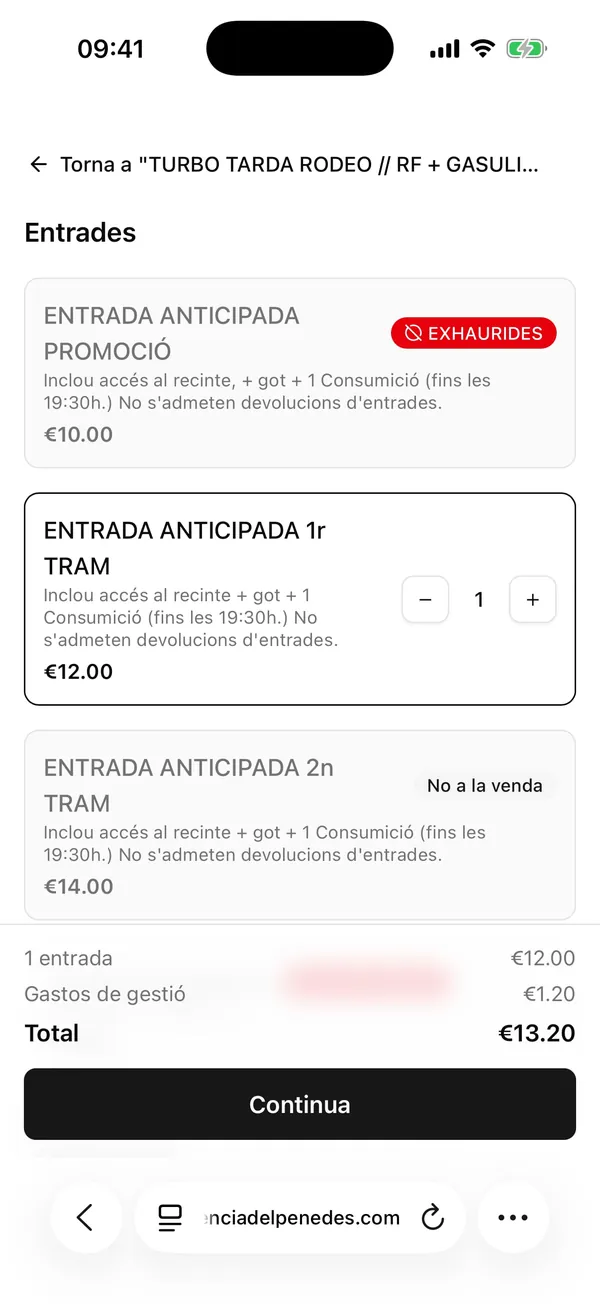
What buyers see
Each tier shows its status: sold out, on sale, or not on sale yet. Buyers understand at a glance that the price is about to go up.
Nothing to change during the sale
No need to keep changing prices by hand: moving from one tier to the next happens automatically when its tickets sell out.
Booking fee shown from the first step
The total including the booking fee is shown before continuing, with no surprises at the end.
Frequently asked questions
Can each tier have its own price and quantity?+
Yes. Each tier has its own price, quantity and description.
Do buyers see sold-out tiers?+
Yes. Sold-out tiers are marked as sold out, and tiers that have not opened yet are marked as not on sale.
Can I run a limited promo ticket?+
Yes. The promo ticket is just another tier with its own price and quantity. When it sells out, the first tier opens.
What happens when every tier sells out?+
Buyers see every tier as sold out and can no longer buy tickets for that event.
Want to see it with your own events?
Tell us how you sell today and how many events you run. We'll set up the website with your real events, with no commitment.